The 2026 market for GaN chargers is moving beyond smaller size and higher wattage. Buyers now expect reliable charging for laptops, phones, tablets, and handheld devices. GaN technology can reduce switching losses and support compact thermal designs. However, a smaller charger can still age quickly under continuous heat.
Industry research supports this shift. Yole Group’s Power GaN reports identify consumer fast charging as a major application for gallium nitride devices. Mordor Intelligence and MarketsandMarkets also forecast strong growth in the GaN power semiconductor and charger markets through the decade. These reports suggest wider adoption, but they do not guarantee longer service life. Product quality, thermal management, component selection, and daily use remain decisive.
This guide explains How to extend the service life of GaN chargers through practical maintenance and informed purchasing. We examine operating temperature, ventilation, power loading, cable quality, and protection circuits. A charger placed behind a sofa, covered by clothing, or left at maximum output for hours may experience unnecessary thermal stress. Dust matters too. So does repeated plugging and unplugging.
Marketing specifications can mislead. Higher wattage is not automatically better. Independent safety testing, USB Power Delivery compliance, temperature control, and warranty coverage deserve equal attention. Real-world testing is also valuable, although test conditions may not match every household. That limitation deserves honesty.
The best 2026 GaN charger should balance efficiency, durability, repairability, and safe everyday performance. Its service life depends on both engineering and user habits. Small choices can prevent expensive failures.
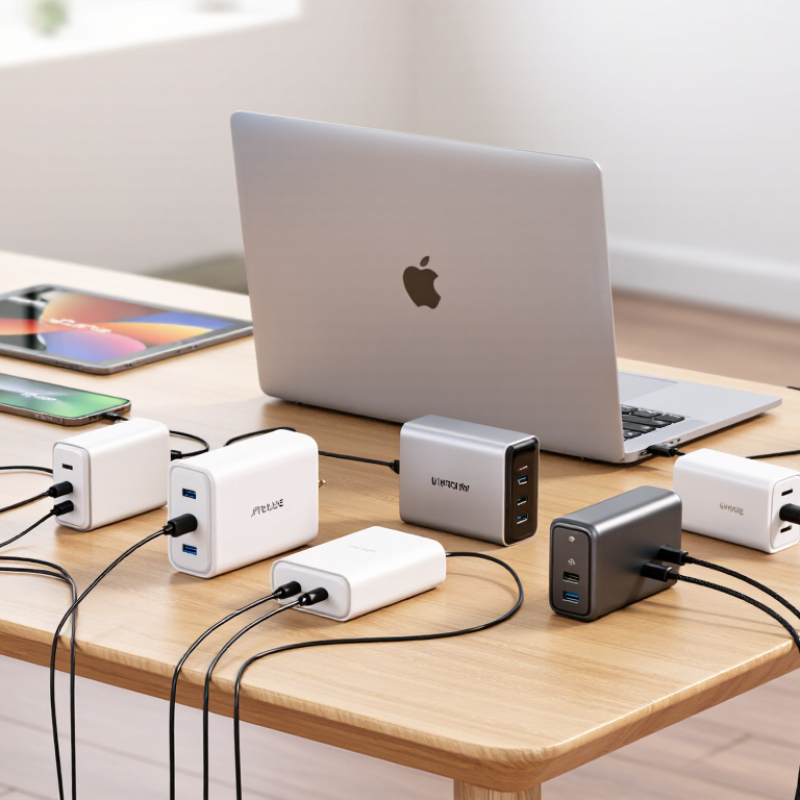
GaN chargers use gallium nitride switches instead of traditional silicon switches. GaN handles higher switching frequencies with lower energy loss. This allows smaller transformers, shorter charging paths, and lighter adapters. The U.S. Department of Energy’s external power supply research links higher efficiency with reduced heat and standby consumption. Yole Group’s 2024 Power GaN report also identifies consumer charging as a major growth area. Smaller does not always mean cooler.
In daily use, lower heat can reduce stress on capacitors and circuit boards. That may support a longer service life, especially during repeated fast-charging cycles. However, laboratory efficiency is not household reality. Dust, poor ventilation, unstable sockets, and hot rooms still matter. I have seen compact chargers become warm inside a crowded power strip. GaN is efficient, not magical. Cable quality and connector wear also affect performance. Some chargers fail early because users mistake “high wattage” for universal compatibility.
Tips: Keep the charger uncovered and away from radiators. Use a certified cable with suitable power ratings. Avoid bending the cable sharply near its plug. Unplug the adapter during long periods of non-use. Check for unusual heat, buzzing, or a loose connection. Stop using it if the casing cracks. A 2024 International Energy Agency review emphasizes efficient power use across everyday electronics, but efficiency depends on operating conditions. This is easy to overlook. The best maintenance habit is simple: give the charger airflow, stable power, and realistic expectations.
Choosing a reliable GaN charger in 2026 requires more than checking its wattage. The Yole Group Power GaN market report forecasts strong growth in GaN power devices through 2030. That growth also brings uneven quality. Look for USB-IF certification, clear input ratings, and protection against overvoltage, overheating, and short circuits. Certification is not decoration.
Check the charger’s power profile. USB Power Delivery Extended Power Range supports outputs up to 240 watts, according to USB-IF specifications. Most phones and tablets need far less. A 65-watt model usually offers a practical balance for daily devices. It should maintain stable output when two ports operate together. Cheap labels can hide serious power-sharing limits.
Heat is the quiet enemy. During testing, place the charger beside a wall outlet, not under clothing or bedding. A warm case is normal; an uncomfortable case deserves attention. GaN reduces switching losses, but it does not remove thermal stress. The International Energy Agency’s 4E initiative has repeatedly highlighted efficiency losses from connected devices, including idle power use. Choose a model with low no-load consumption.
Cable quality matters too. A high-power charger needs a suitable USB-C cable with proper current markings. I would replace a frayed cable immediately. One imperfect assumption remains: smaller size does not always mean longer life. Internal component quality, ventilation, and conservative power design matter more than appearance.
| Evaluation Dimension | Recommended Specification or Practice | Why It Matters | Service-Life Guidance |
|---|---|---|---|
| Charging Standard | USB Power Delivery with Programmable Power Supply (PPS) support when required by the device | A recognized negotiation standard helps the charger and device select a suitable voltage and current instead of relying on fixed, incompatible outputs. | Use the lowest power mode that fully meets the device requirement; maximum wattage is not necessary for every device. |
| Maximum Output | Choose according to the equipment: approximately 20–30 W for phones, 45–100 W for many laptops, and higher ratings only when the laptop or dock requires them. | Oversized capacity can increase cost and physical size without improving charging speed when the device has a lower input limit. | Avoid operating continuously at the charger's maximum output if a lower-power model provides sufficient headroom. |
| USB PD 3.1 Capability | For high-power applications, verify the required Extended Power Range profile; USB PD 3.1 can support power levels up to 240 W when the charger, cable, and device all support them. | High-power charging depends on the complete system, not only the charger label. | Use a correctly rated cable and keep high-power charging equipment well ventilated. |
| Power Sharing | Check the output allocation when two or more ports are used; total output is often lower than the sum of the printed single-port ratings. | Automatic power redistribution can reduce charging speed and may change the output available to an already connected device. | For demanding devices, use the primary high-power port alone whenever practical. |
| Thermal Design | Prefer documented thermal protection, adequate ventilation, and a design that does not become excessively hot during sustained rated-load testing. | Heat accelerates aging of electrolytic capacitors, insulation, solder joints, and other electronic components. GaN technology improves switching efficiency but does not eliminate heat. | Do not cover the charger, place it under bedding, or use it in direct sunlight. Unplug it if there is a burning smell, smoke, or abnormal noise. |
| Protection Functions | Look for over-voltage, over-current, over-temperature, short-circuit, and input surge protection. | These functions help limit damage caused by faults, excessive load, abnormal temperature, or transient events. | Protection features reduce risk but cannot compensate for blocked ventilation, water exposure, or damaged cables. |
| Output Stability | Select products with published electrical test data or credible independent testing for regulation, ripple, efficiency, and load behavior. | Stable output helps reduce charging interruptions and limits unnecessary electrical stress on connected equipment. | Replace the charger if output repeatedly cuts out, oscillates, or causes devices to reconnect. |
| Efficiency | Compare efficiency at typical loads rather than relying only on the maximum rating; higher efficiency generally means less heat during operation. | Lower conversion losses can improve energy use and reduce thermal stress. | Use a charger close to the normal load range instead of permanently operating a very small charger at its limit. |
| Cable Compatibility | Use a cable rated for the intended current and power. For USB PD above 3 A, use an electronically marked cable with the appropriate rating. | Cable capability affects negotiation, charging speed, temperature, and safety. | Replace cables with frayed insulation, loose connectors, bent contacts, or heat damage. |
| Input Voltage Range | For travel use, confirm support for the local mains range, commonly 100–240 V AC, 50/60 Hz, when stated on the product label. | A wide input range improves compatibility across regions, but plug shape and local safety requirements still matter. | Use a suitable plug adapter; do not force a loose or incompatible connection. |
| Safety Compliance | Check for applicable regional conformity markings, electrical safety documentation, model identification, and traceable manufacturer information. | Traceability and independent compliance testing are stronger indicators than marketing terms alone. | Keep purchase records and follow the stated warranty, inspection, and disposal instructions. |
| Daily Operating Environment | Use the charger in a dry, clean, ventilated location within the operating temperature specified in its documentation. | Dust, moisture, vibration, and high ambient temperature can increase electrical and mechanical stress. | Keep ventilation openings clear and avoid leaving the charger in a hot vehicle or near liquid. |
| Connection and Storage | Insert and remove connectors straight, avoid pulling the cable, and store the charger without sharply bending the lead. | Mechanical strain is a common cause of loose ports, broken conductors, and intermittent charging. | Inspect the plug and port periodically; stop using any component that becomes loose, hot, or visibly damaged. |
| Expected Service-Life Factors | Evaluate operating temperature, load level, power-cycle frequency, component quality, and warranty support rather than assuming a fixed lifespan. | No universal service-life figure applies to every GaN charger because internal design and usage conditions vary. | A cooler operating environment, moderate loading, and careful handling generally support longer service. |
| Replacement Warning Signs | Replace the unit for cracked housing, discoloration, persistent buzzing, burning odor, repeated shutdowns, exposed conductors, or abnormal heat. | These signs may indicate insulation failure, component degradation, overheating, or an internal fault. | Disconnect it from mains power and do not open or repair a mains-powered charger unless qualified to do so. |
Gallium nitride chargers run efficiently, but efficiency does not mean zero heat. Yole Group’s 2024 Power GaN report identifies fast charging as a major growth application for GaN devices. More power still creates more thermal stress. A 65-watt charger delivering high output can feel noticeably warm, especially inside a crowded power strip.
Keep the charger in open air. Leave at least 3–5 centimeters around its vents and casing. Do not place it under clothing, bedding, or a laptop. Use a cable rated for the required power, because resistance in a poor cable can create extra heat. Avoid charging several devices at maximum output for hours. Lower demand usually lowers internal temperature.
The U.S. Department of Energy’s Level VI framework evaluates active-mode efficiency and no-load consumption for external power supplies. That distinction matters. A charger can waste less energy than older designs, yet still heat up under heavy load. In practical checks, touching the casing every 20–30 minutes can reveal rising temperature early. Warm is normal. Painfully hot is not. Stop using it if the casing smells unusual, changes shape, or becomes too hot to hold comfortably.
One mistake is trusting compact size too much. Small cases have less surface area for heat release. Let the charger cool before storing it in a bag. I would also avoid using it while covered, even briefly. That habit seems harmless, but repeated heat cycles may weaken components over time.
Dust gathers around vents, USB ports, and cable joints. I once stored a charger in a warm drawer. It later became noticeably hotter during ordinary charging. GaN reduces switching losses, but it does not defeat heat, moisture, or mechanical stress. Keep the charger unplugged before cleaning. Use a dry microfiber cloth and a soft brush. Never spray liquid into the ports. USB-IF’s USB Power Delivery 3.1 specification supports power levels up to 240 watts, making clean contacts and suitable cables increasingly important.
Tips:
Let the charger cool before storage. Keep it in a ventilated, dry place. Avoid sealed plastic bags after use. Coil the cable loosely, not tightly around the charger. Check for bent pins, cracked insulation, discoloration, or a sharp burning smell. Stop using damaged equipment. Small signs matter.
The U.S. Department of Energy’s Level VI external power supply requirements emphasize efficiency during active and no-load conditions. Unplugging unused chargers still reduces unnecessary standby consumption. IEC 62368-1 also treats excessive temperature and electrical damage as important equipment hazards. Do not cover a working charger with clothing or bedding. Avoid direct sunlight, radiators, and overloaded extension boards. My own weak habit is rushing storage while the adapter remains hot. That habit deserves correction. A cool-down period of ten minutes is simple, though not always convenient. It may help protect internal components and preserve stable charging performance.
A GaN charger can still power a device while showing early signs of failure. That is the uncomfortable part. Check the casing for cracks, swelling, discoloration, or melted plastic. Inspect the plug and charging port for looseness, bent contacts, or dark marks. A sharp burnt smell matters too.
During use, notice unusual heat, buzzing, repeated charging interruptions, or a cable that disconnects easily. Warmth is normal, but the charger should not become painful to touch. Test it with a reliable cable and another compatible device. If the problem follows the charger, stop using it. Do not open the casing. Internal components can retain dangerous electrical energy.
Unplug the charger before inspecting it. Let it cool on a hard, uncovered surface. Never test a damaged unit near water or with exposed wires. I used to treat occasional charging drops as a cable problem, but that assumption can waste time. A cracked shell deserves more attention than a slow charging session.
Choose a replacement with matching output requirements and recognized safety certification. Check the voltage and power labels carefully. Do not rely only on a higher wattage number. A suitable charger should fit securely without forcing the port. Recycle the old unit through an approved electronic waste service where available. Keep the damaged charger away from children and regular household storage until disposal.
Fast charging creates thermal stress, even when the charger works efficiently. Warm is normal. Very hot is not.
Leave about 3–5 centimeters around the casing and vents. Keep it in open air, not under clothing, bedding, or a laptop.
Yes. Higher resistance can create extra heat and reduce charging stability. Use a cable rated for the required power.
Avoid doing this for hours. Lower demand usually reduces internal temperature and thermal stress.
Check the casing every 20–30 minutes. Stop using it if it smells strange, changes shape, or becomes painful to hold.
Unplug it and let it cool for about ten minutes. Wipe it with a dry microfiber cloth and use a soft brush around ports.
Store it in a dry, ventilated place. Avoid sealed plastic bags, direct sunlight, radiators, and overloaded extension boards. Coil the cable loosely.
Look for cracks, swelling, melted plastic, dark marks, buzzing, repeated interruptions, or loose connections. I once blamed the cable too quickly. That assumption can waste time.
No. Internal parts may retain dangerous electrical energy. Keep the unit unplugged and away from children until approved electronic recycling is available.
Match the required voltage, power, connector, and cable rating. Do not rely only on a higher wattage number. Secure fit matters.
GaN chargers differ from traditional chargers because they use gallium nitride technology to deliver higher power in a smaller, lighter, and more efficient design. In 2026, choosing a reliable GaN charger means checking its power rating, safety protections, port compatibility, cable quality, and temperature control. A well-designed charger should support the devices you use while avoiding unnecessary power demands.
Learning how to extend the service life of GaN chargers involves using the correct cable, keeping ventilation areas clear, and unplugging the charger when it is not needed for long periods. Avoid covering it during operation, exposing it to moisture, or storing it in extremely hot or cold environments. Regularly remove dust with a dry, soft cloth and protect the charger from drops and pressure. If you notice unusual heat, damaged ports, burning odors, unstable charging, or visible cracks, stop using it and replace it safely with a compatible model.

Laisen Electronic