2026 How to Choose Wall Mount vs Desktop Adapters

Time:2026-09-30 Author:Ethan
0%

Choosing between a wall-mount adapter and a desktop adapter can affect safety, space, heat, and daily convenience in 2026. The right choice depends on your device, workspace, cable length, and installation conditions. A compact charger behind a monitor may look cleaner, while a desktop unit can sit visibly beside a laptop and remain easy to replace. Small details matter.

What is the difference between wall-mount and desktop adaptors? Wall-mount models usually connect directly to an outlet, saving desk space and reducing loose cables. Desktop adaptors use a power cord and place the adapter body on the floor or work surface. This design can improve ventilation and support higher-power equipment, but it may create clutter around your feet. The best option is not always the smallest one.

This guide compares both formats through practical, experience-based considerations. It examines power ratings, thermal performance, portability, connector placement, cable strain, and long-term reliability. Look for clear electrical specifications, recognized safety certifications, suitable input voltage, and protection against overcurrent or overheating. Manufacturer documentation should be available and understandable. Do not rely on appearance alone.

A wall adapter may feel convenient in a hotel room. A desktop adapter may work better beneath a crowded office desk. Real use can expose weaknesses. A short cable, blocked vents, or a heavy plug can quickly change your preference. Personal testing helps, although professional advice remains important for permanent installations. When uncertainty remains, consult a qualified technician and follow local electrical requirements.
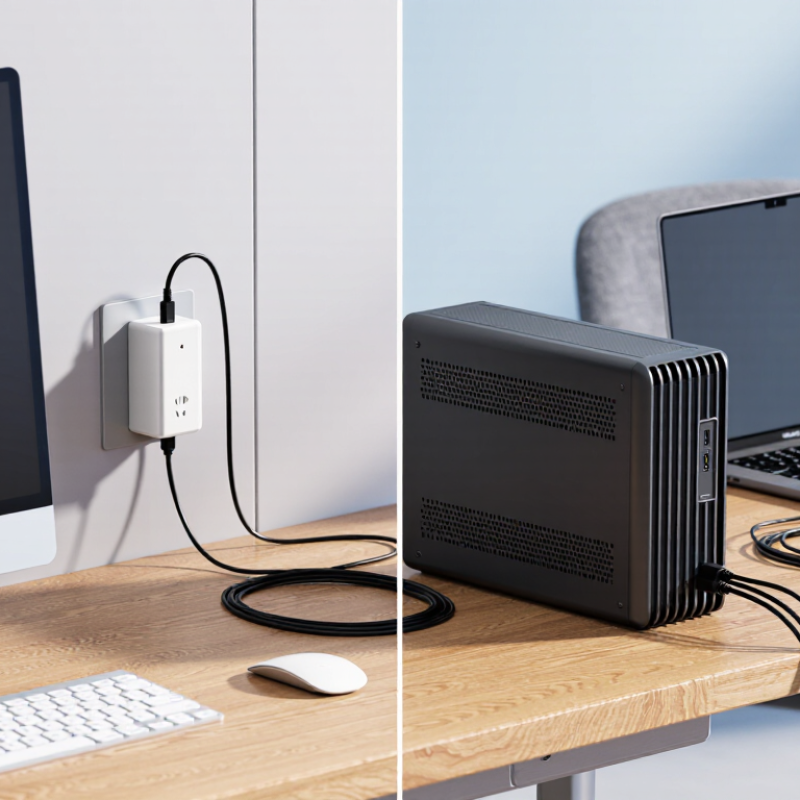
2026 How to Choose Wall Mount vs Desktop Adapters

Define Wall-Mount and Desktop Adapter Designs

A wall-mount adapter plugs directly into a mains outlet. Its enclosure holds the power-conversion components, and its prongs carry the adapter’s weight. A desktop adapter places that enclosure on a desk or floor, connected to the outlet by a separate AC cord. Its low-voltage cable then runs to the device. Small detail, big difference.

The layouts change how power is delivered physically, not necessarily how much is available. USB-IF’s USB Power Delivery 3.1 specification supports power levels up to 240 watts, but the specification does not require one enclosure style. DOE’s Level VI external power supply requirements set a 0.1-watt no-load limit for supplies rated up to 49 watts. That figure concerns standby consumption, not adapter size or output capacity.

In practice, a wall-mount unit can keep a short cable run and reduce desk clutter, but a large body may block a neighboring socket. A desktop unit offers more freedom to position the enclosure, though its AC cord adds another cable to route. Check plug clearance, cable reach, ventilation, and the device’s required voltage and current. The distinction sounds tidy; real designs can blur it. A compact desktop brick may sit near the outlet, while a wall-mounted model can still feed a long cable across a table.

Compare Installation Space, Portability, and Accessibility

2026 How to Choose Wall Mount vs Desktop Adapters

Compare installation space, portability, and accessibility before choosing an adapter. A wall-mounted unit keeps a desk clear and can reduce cable clutter near a workstation. It works well when an outlet sits behind a desk or beside a counter. Check the adapter’s size and plug direction first; a bulky body may block a neighboring outlet. Wall placement is less convenient when you need to unplug it often. I learned that the hard way.

Desktop adapters are easier to move between rooms and reach during daily use. You can see connected ports, swap cables quickly, and keep the unit close to a laptop or monitor. The trade-off is space: adapters and cords can crowd a small desk. Measure the available surface, and leave room for ventilation. A tight corner may trap heat, even when the setup looks tidy. It happens.

Tips: For a fixed setup, test the wall outlet with nearby furniture in place. For shared workspaces, choose a portable adapter with clearly labeled ports. Keep cables loose enough to remove without pulling the device. If access matters more than neatness, desktop placement may be the practical choice. I still prefer a clean desk, but convenience usually wins.

2026 How to Choose Wall Mount vs Desktop Adapters

Compare installation space, portability, and accessibility using typical form-factor ratings. Ratings are practical comparisons on a 1–5 scale, where 5 is best; actual performance depends on the adapter and installation.

Quick take: Wall-mount adapters generally free up desk space, while desktop adapters are easier to move and reach. Choose based on whether a clear work surface or convenient access matters more.

Evaluate Power Output, Compatibility, and Safety Standards

2026 How to Choose Wall Mount vs Desktop Adapters
Evaluate Power Output, Compatibility, and Safety Standards

A wall-mount adapter keeps a desk clear and can suit fixed equipment near an outlet. A desktop adapter is easier to move and often has a longer cable. Neither shape guarantees better performance. Match the adapter’s output voltage to the device’s requirements, then confirm its connector type and polarity. Check the label, not just the product photo. Small differences matter.

Compare the required wattage with the adapter’s rated output; never assume a higher number is automatically suitable. For devices with changing power demands, consult the device manual for its recommended supply. Look for applicable electrical safety certification and clear ratings on the adapter. Keep ventilation openings uncovered, and avoid placing a warm adapter under papers or behind curtains. Heat is easy to overlook. So is cable reach: a wall unit may fit the outlet but strain the cord.

Tips: Measure the outlet location and cable path before choosing. Inspect the plug and casing for damage, and replace questionable equipment. I’d recheck compatibility even when a connector seems to fit; that extra check takes seconds.

Assess Cable Management, Heat Dissipation, and Maintenance

For wall-mount versus desktop adapters, cable routing affects both service access and airflow. A wall-mounted unit can keep cords off a crowded desk, but a tight bend behind furniture may strain the plug. Leave a visible service loop and avoid bundling cables against ventilation openings. Desktop placement makes inspection easier; it can also turn a neat workspace into a knot of cords. I still find this easy to underestimate.

Heat needs room to escape. ASHRAE’s TC 9.9 thermal guidelines give 18–27°C as the recommended inlet-air range for common data-center equipment; this is useful context, not a guaranteed operating limit for every adapter. Keep the adapter away from rugs, curtains, and sun-warmed windows, and follow its own manual. A wall outlet behind a cabinet may look tidy but trap warm air. Check the case after sustained use, and investigate unusual heat, odor, or intermittent power rather than assuming the position is harmless.

Maintenance favors whichever setup you can reach without moving heavy furniture. Desktop units are usually easier to unplug and inspect, while wall-mounted units may need clearance for cleaning and replacement. Keep labels visible and connections accessible. Small details matter. A quick monthly glance can catch dust, loose plugs, or pinched insulation; it is not a substitute for manufacturer guidance.

2026 How to Choose Wall Mount vs Desktop Adapters - Assess Cable Management, Heat Dissipation, and Maintenance
Evaluation Dimension Wall-Mount Adapter Desktop Adapter Practical Assessment
Cable Management Strong
Keeps the power brick off the desk or floor and can reduce visible cable loops when the outlet is close to the equipment.
Moderate
The brick remains on the work surface or floor, so extra routing space is usually needed for the input and output cables.
Choose wall mount for clean, fixed installations. Choose desktop when cables must be frequently rearranged or extended.
Heat Dissipation Installation-dependent
Airflow may be restricted if the adapter is pressed against a wall, enclosed behind furniture, or covered by nearby materials.
Generally better
A desktop unit can be positioned with clearance on several sides, allowing natural convection around its enclosure.
For either design, maintain ventilation clearance and avoid soft surfaces. A cooler location can improve long-term reliability.
Maintenance Access Moderate to limited
Access may require reaching behind equipment or disconnecting mounted hardware, especially in crowded installations.
Easy
The unit can usually be inspected, unplugged, or replaced without moving wall-mounted equipment.
Desktop designs are preferable where regular inspection, testing, or rapid replacement is expected.
Space Efficiency High
Uses wall or outlet space and leaves more room on the desk, shelf, or equipment rack.
Moderate
Requires a stable surface and may occupy valuable workspace, particularly when several adapters are installed.
Wall mount is more suitable for compact work areas, kiosks, cabinets, and permanent equipment locations.
Installation Flexibility Lower
Best suited to a fixed outlet and equipment position. Relocation may require cable changes or new mounting points.
High
Can be moved between outlets or devices with minimal installation effort, provided the electrical ratings remain suitable.
Select desktop units for temporary workstations, test benches, and frequently changing layouts.
Mechanical Stability High when correctly installed
A secure mounting method minimizes movement and reduces strain on connected cables.
Surface-dependent
The adapter can slide, fall, or be pulled by a taut cable if it is not positioned securely.
Wall mounting is advantageous in vibration-prone or high-traffic locations, while desktop placement is simpler in controlled areas.
Dust and Debris Exposure Variable
Elevation can reduce contact with floor dust, but wall recesses and enclosed spaces may still collect debris.
Moderate
Placement on floors or open shelves can expose the adapter to dust, spills, and accidental impact.
Keep either format clean and dry. Avoid placing adapters directly on carpets, near liquids, or in dusty areas.
Cable Strain Risk Low when routed correctly
Fixed mounting can reduce pulling forces, but excessive bending near the plug or outlet may still damage the cable.
Moderate
Movement of the adapter or connected equipment can place additional tension on cables.
Use gentle bends, avoid sharp kinks, and provide strain relief where the cable exits the adapter or connector.
Replacement Convenience Moderate
Replacement is straightforward when the outlet is accessible, but may be inconvenient behind furniture or fixed equipment.
High
The unit is generally visible and easy to disconnect, compare, and replace.
Desktop is the better choice for applications where minimizing service interruption is important.
Recommended Use Case Permanent displays, networking points, charging stations, security equipment, and space-constrained installations. Workstations, laboratories, temporary setups, medical or test equipment, and systems requiring frequent access. Match the form factor to the installation environment, expected service frequency, airflow, and cable-routing needs.
Overall Decision Rule Select wall mount when a tidy, space-saving, and stable installation is the priority. Select desktop when ventilation, accessibility, mobility, and simple replacement are the priority. Verify output voltage, current capacity, connector compatibility, electrical safety requirements, and manufacturer clearance instructions before installation.

Choose the Adapter Type for Your Device and Workspace

2026 How to Choose Wall Mount vs Desktop Adapters

Choose an adapter that fits both your device and the space around it. A desktop adapter sits on a desk or shelf, often with a cable between the power brick and device. That can make connections easier to reach and keep a heavy adapter from pulling on a wall outlet. It does take up space. A wall-mount adapter plugs directly into an outlet, which can clear a crowded desk. Check its size and position; a wide casing may cover a neighboring socket or sit awkwardly behind furniture.

Match the adapter’s output voltage, current capacity, connector, and polarity to your device’s requirements. The label or manual is a more reliable guide than appearance alone. In a small home office, I’ve found that a wall plug can look tidy but become inconvenient when the outlet is behind a cabinet. Cable length matters, too. Leave enough slack to avoid tension, and keep ventilation openings clear. I still catch myself judging an adapter by its shape first, which is not a dependable method.

Tips: Measure outlet clearance before buying. Check whether the plug orientation suits your socket. For a desktop setup, place the adapter where it stays dry, stable, and easy to inspect. A little planning helps.

FAQS

What is a wall-mount adapter?

It plugs directly into a wall outlet. Its enclosure hangs from the outlet, while a low-voltage cable powers the device. Small detail, big difference.

What is a desktop adapter?

Its power-conversion enclosure rests on a desk or floor. A separate AC cord connects it to the outlet. Another cable reaches the device.

Does the adapter style determine its power output?

Not necessarily. Wall-mounted and desktop designs can provide similar voltage and current. Check the device requirements and adapter label, not its shape.

When is a wall-mount adapter useful?

It keeps cords off a crowded desk. It works well behind a desk or beside a counter. However, a bulky body may block another outlet.

When is a desktop adapter more practical?

Choose it when you need easy access. You can move it between rooms, inspect ports, and change cables quickly. Portability matters.

How should I manage cables around either adapter?

Leave a visible service loop near the connection. Avoid sharp bends, tight bundles, and cables pressed against ventilation openings. Loose cables are easier to inspect.

How can I reduce overheating risks?

Keep the adapter away from rugs, curtains, and direct sunlight. Leave space around its enclosure. A cabinet corner may look neat but trap warm air.

Which design is easier to maintain?

Desktop units are usually easier to unplug and inspect. Wall-mounted units need enough clearance for cleaning and replacement. Access often beats neatness.

What should I check before installation?

Measure outlet clearance, cable reach, and desk space. Confirm voltage and current requirements. Test the setup with nearby furniture in place.

What warning signs should I watch for?

Check for unusual heat, odor, loose plugs, or intermittent power. Stop assuming the position is harmless. I have underestimated cable strain before.

Conclusion

Choosing between a wall-mount adapter and a desktop adapter depends on how you use your device and the space around it. What is the difference between wall-mount and desktop adaptors? A wall-mount design plugs directly into an outlet, keeping the floor and desk clear, while a desktop model usually sits on a work surface and connects to the outlet with a separate power cord. Wall-mounted units are convenient for fixed setups, whereas desktop models can be easier to move, reach, and connect to multiple devices.

Before choosing, check that the adapter’s power output and connectors match your device, and look for appropriate safety features and standards. Consider whether its size may block nearby outlets, how its cables will be arranged, and whether it has enough ventilation to manage heat. A wall-mount adapter may suit a compact, permanent setup; a desktop adapter may be a better fit when you need accessible ports, flexible placement, or simpler cable organization.

Ethan

Ethan

Ethan is a seasoned marketing professional with a deep expertise in our company's innovative product line. With a passion for sharing knowledge and insights, he takes the lead in regularly updating our corporate blog, where he explores industry trends, product features, and effective marketing......