7 Best Ways to Store Power Adapters and Chargers?

Time:2026-09-25 Author:Mason
0%

Chargers often end up in a drawer, tangled around earbuds and spare cables. That clutter is more than annoying: tight bends, crushed plugs, and heat can damage a power adapter over time. How to store power adapters and chargers properly starts with a simple habit: let each charger cool, then coil its cable loosely without pulling it against the plug. Small details matter.

UL consumer-safety specialist John Drengenberg has often addressed everyday electrical risks. A practical paraphrase of his safety message is: inspect cords regularly and replace damaged equipment rather than continuing to use it. This is especially useful when sorting a crowded charging drawer. Look for cracked insulation, bent prongs, loose connectors, or a warm, discolored adapter. Don’t ignore those signs.

The seven storage methods in this guide focus on ordinary, workable routines: separate chargers by device, use soft ties instead of tight knots, and keep adapters in a dry, ventilated place. A labeled pouch can help when traveling. A small box with dividers can stop heavy plugs from pressing against delicate cables. Still, no organizer can repair a damaged charger, and neat storage is not a substitute for checking equipment. That part is easy to forget. Use the tips as a starting point, then adjust them to your devices and available space.
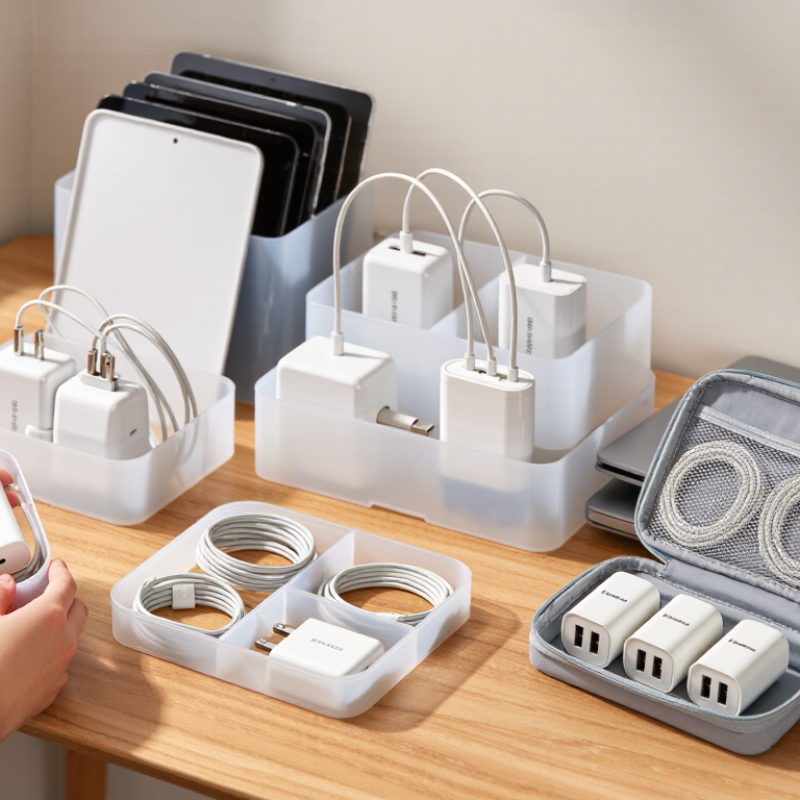
7 Best Ways to Store Power Adapters and Chargers?

Classify Chargers by Connector, Wattage, and USB PD 3.1’s 240 W Limit

Sort chargers by connector first: USB-C, Lightning, Micro-USB, and barrel plugs each get a separate pouch or labeled compartment. Connector shape alone does not reveal charging capacity. Add a wattage label to every adapter, such as 20 W, 65 W, or 100 W. This small step helps prevent pairing a low-output charger with a device that needs more power. Keep detachable cables beside their matching adapter, but secure them loosely to avoid stressing the plug. Labels can peel. Check them occasionally.

Wattage deserves special attention with USB Power Delivery 3.1. The USB Implementers Forum’s 2021 specification update raised the maximum supported power from 100 W to 240 W through Extended Power Range, with 28 V, 36 V, and 48 V voltage levels. Store chargers rated above 100 W in a distinct, clearly marked section, and keep their compatible high-power cables nearby. USB-IF guidance also makes clear that cable capability matters; a USB-C connector alone does not confirm support for 240 W. For everyday use, a simple label might read “USB-C, 65 W” or “USB-C, EPR, 240 W.” I would still verify worn or faded labels against the device manual before plugging anything in.

Classify Chargers by Connector and Power Limit

These bars show maximum power defined by the listed charging specifications: USB Battery Charging 1.2 allows up to 7.5 W, USB-C PD Standard Power Range (SPR) up to 100 W, and USB-C PD 3.1 Extended Power Range (EPR) up to 240 W. Actual charging power depends on the charger, cable, and device. Barrel-plug adapters are not included because their power limits vary by model.

Coil Cables Above Their Minimum Bend Radius Under IEC 62680 Guidance

When storing USB power adapters, coil each cable in broad, relaxed loops rather than wrapping it tightly around the adapter body. IEC 62680 covers USB interfaces and power-related requirements, but it does not set one universal storage bend radius for every cable. Check the cable maker’s guidance when available, and avoid bends tighter than its stated minimum radius. No specification? Keep the curve visibly gentle.

A loose coil should sit flat without kinks or pressure from heavier items. Use a soft reusable tie to keep it together, leaving a little room instead of cinching the cable down. Small loops can strain the conductors near the plug, where the cable is already less flexible. Feel for sharp creases as you coil; if one forms, open the loop and reshape it. That takes a moment.

Keep adapters and cables in a dry drawer, with plug ends protected from knocks. Don’t force a tidy coil into a crowded pouch—the cable may spring back into a tight bend. It is easy to overdo neatness. A slightly uneven, wide coil is usually kinder to the cable than a compact one.

Use Ventilated Compartments for UL 62368-1-Compliant Heat Management

Power adapters often remain warm after a laptop or tablet is unplugged. Give them time to cool before placing them in a drawer or storage box. Choose a compartment with open sides, mesh panels, or generous gaps around each adapter. Warm air needs somewhere to go. Avoid tight bundles and deep piles, which can trap heat and press cables against hot surfaces. A simple fabric divider can keep chargers apart without enclosing them completely.

UL 62368-1 addresses safety hazards in covered electronic equipment, including heat-related risks. It does not mean that any storage case becomes compliant just because it has ventilation. Keep adapters on a hard, dry surface while charging, and follow the maker’s use and care instructions. After use, check for cracked housings, bent plugs, or frayed cable jackets before storing them. Small details matter. I sometimes tuck a charger away too quickly, and that is exactly when a warm adapter can end up buried under papers. Leave space around vents, keep compartments easy to inspect, and don’t store a charger that feels unusually hot or smells odd.

Separate High-Voltage Adapters from Moisture, Metals, and Flammable Materials

7 Best Ways to Store Power Adapters and Chargers?

Separate High-Voltage Adapters from Moisture, Metals, and Flammable Materials

Treat every adapter’s wall-plug side as mains-powered equipment, even when its output is low voltage. Unplug it and let it cool before putting it away. Store it in a dry, ventilated drawer, away from sinks, damp cloths, and condensation-prone windows. Keep loose paper, bedding, and other easily ignited materials out of the same compartment. A little space matters.

Loose metal can bridge exposed contacts or scratch insulation. Keep adapters apart from keys, coins, screws, and tangled cable ends; use separate fabric pockets or dividers. Coil cords loosely, without sharp bends, and check for cracked housings or frayed insulation before reuse. If a plug or casing feels unusually hot, stop using it and have it checked. That small inspection is easy to skip.

NFPA’s 2021 report, Home Fires Involving Electrical Distribution and Lighting Equipment, estimated an average of 32,620 U.S. home fires annually involving this broad equipment category during 2015–2019. The figures are not specific to chargers, but they underline why damaged electrical gear deserves care. Storage cannot fix a faulty adapter. And a tidy drawer is not a safety test.

Label Seven Storage Zones for Faster Retrieval and Lower Cable-Strain Risk

7 Best Ways to Store Power Adapters and Chargers?

Label seven storage zones: wall adapters, USB-C chargers, older plug types, multiport chargers, power banks, long cables, and short cables. Use separate bins or drawer dividers, and place each label where it stays visible. A small tag on a cable can identify its matching adapter. Keep frequently used items near the front. This saves rummaging and reduces accidental pulling on nearby cords.

Coil cables loosely in broad loops, then secure them with soft ties. Tight bends near the connector can weaken the cable over time. Don’t stack heavy adapters on top of coiled cords. Let warm chargers cool before putting them away, and keep storage dry. If an adapter feels unusually hot, has a cracked case, or shows exposed wiring, set it aside for inspection instead of returning it to the everyday zone. Labels help, but they cannot make a damaged item safe.

Tips: Use large-print labels for shared drawers. Keep it simple. Review the zones every few months; people often put things back in the wrong bin, and that’s useful feedback. Rename labels when your actual habits differ from the original plan.

7 Best Ways to Store Power Adapters and Chargers: Label Seven Storage Zones for Faster Retrieval and Lower Cable-Strain Risk

A practical zone-based system for keeping chargers easy to identify, safely separated, and stored without tight cable bends.

Storage Zone What to Store Suggested Storage Method Cable-Strain Control Recommended Label Fast-Retrieval Tip
1. Daily-Use Chargers Chargers and adapters used most days Open-top desktop tray or a shallow drawer organizer near the charging area Lay cables in loose loops; avoid winding them tightly around the adapter DAILY USE Keep the most frequently used items in the front section.
2. Travel Kits Travel-ready chargers, short cables, and compact accessories Separate zip pouch or small compartmentalized case Use a reusable hook-and-loop tie and leave a gentle curve near each connector TRAVEL Store a complete, checked travel set together rather than gathering items before each trip.
3. High-Power Adapters Larger laptop or equipment power supplies and their matching leads Spacious ventilated bin with dividers to keep heavy adapters from pressing on cables Keep cords uncompressed and do not hang heavy adapters by their cables HIGH POWER Use a separate compartment for each adapter and its matching cable.
4. Device-Specific Sets Chargers and cables reserved for particular devices Individual labeled compartments or small pouches grouped by device type Store each cable loosely with its adapter; avoid sharp folds at the plug ends DEVICE TYPE Label by the device or use, such as “tablet” or “camera,” rather than by cable color alone.
5. Shared and Guest Chargers Spare chargers intended for visitors or shared spaces Clearly marked basket or drawer in a common, easy-to-reach location Keep adapters and cables untangled in separate sections of the basket SHARED CHARGERS Return items to the same labeled section after use.
6. Spare and Backup Stock Working chargers and cables kept as replacements Dry, closed storage box with dividers; keep the contents visible or listed on the box Store cables in loose coils and avoid placing heavy objects on top SPARES — CHECK BEFORE USE Keep this zone separate from daily-use items to prevent accidental mixing.
7. Inspection and Quarantine Chargers with uncertain condition, loose connectors, or visible cable damage Separate, clearly marked container away from working chargers Do not bend, bundle tightly, or return damaged items to general storage DO NOT USE — INSPECT Review before reuse; remove items with exposed wires, cracked casing, or other visible damage.

Storage reminder: Keep chargers dry and well ventilated. Disconnect equipment before storage, avoid tight bends and sharp kinks, and use labels that remain readable during normal handling.

FAQS

How should I sort chargers in a drawer?

Separate them by connector, such as USB-C, Lightning, Micro-USB, and barrel plugs. Use labeled pouches or dividers. Shape alone does not show charging capacity.

Why label each charger with its wattage?

A label like “USB-C, 65 W” makes output easier to check. It can help prevent pairing a low-output adapter with a device that needs more power. Labels may fade, so check them.

What should I know about chargers rated above 100 W?

USB Power Delivery 3.1 supports up to 240 W through Extended Power Range. Keep higher-wattage adapters in a clearly marked section. Not every USB-C cable supports that output.

How should I store high-power cables?

Keep compatible cables beside their adapters, but coil them loosely. Avoid sharp bends near the plug. I sometimes bundle cables too tightly; that is worth rethinking.

Should a warm adapter go straight into storage?

No. Let it cool first, then place it in a dry, ventilated compartment. Warm air needs room to escape.

What kind of storage compartment works well?

Choose open-sided storage, mesh panels, or dividers with gaps around each adapter. Avoid deep piles and tight bundles. Easy to inspect is better.

What should I keep away from chargers?

Store them away from moisture, loose metal, paper, bedding, and other easily ignited materials. Separate pockets can keep keys and coins away from plugs.

What should I check before putting an adapter away?

Look for cracked casing, bent plugs, or frayed cable insulation. Do not store damaged equipment. If an adapter feels unusually hot or smells odd, stop using it and have it checked. A tidy drawer proves little.

Conclusion

How to store power adapters and chargers properly starts with sorting them by connector type and wattage, including devices rated for USB Power Delivery 3.1’s maximum of 240 W. Coil each cable loosely, keeping bends wider than its minimum bend radius to help reduce wear. Store adapters in ventilated compartments so heat can dissipate, and keep higher-voltage units away from moisture, loose metal objects, and flammable materials.

Create seven clearly labeled storage zones, such as separate spaces for everyday chargers, travel adapters, high-wattage units, and spare cables. Keep cords untangled and avoid placing heavy objects on them, making chargers easier to find while reducing strain on plugs and cable connections. A simple, consistent system helps protect equipment, supports safe storage, and keeps frequently used items within reach.

Mason

Mason

Mason is a seasoned marketing professional with a deep expertise in the company's offerings and a passion for driving brand awareness. With a strong background in digital marketing strategies, he has an innate ability to connect with diverse audiences and effectively communicate product benefits.......